Inbound API
Send raw RFC822/EML messages directly into a Kurrier mailbox using the API.
Inbound API
The Inbound API lets you submit raw email messages directly to Kurrier without configuring an external inbound email provider.
This is useful for applications that already have access to raw RFC822/EML messages and want to use Kurrier for storing, inspecting, and working with those messages.
Messages submitted through the Inbound API go through Kurrier's normal message parsing and storage pipeline and appear in the identity's Inbox.
Create an inbound identity
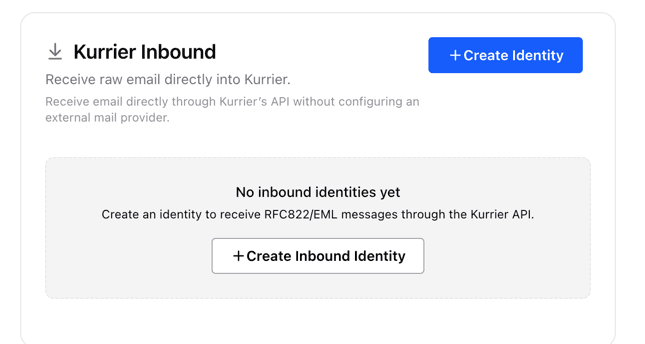
Before sending messages, create an inbound identity from the Kurrier dashboard.
Go to Providers → Inbound and select Create Identity.
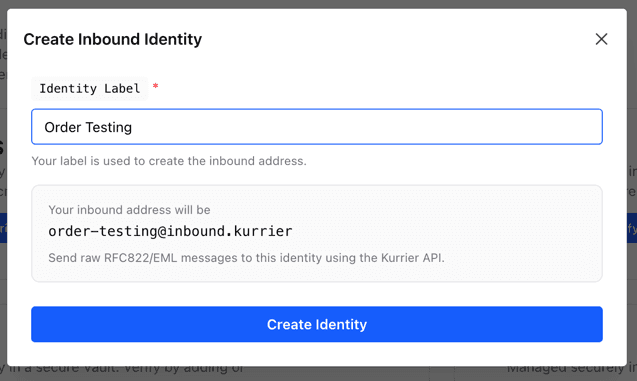
Give the identity a label, for example:
Order TestingKurrier will create an inbound identity such as:
order-testing@inbound.kurrierThe generated address identifies the mailbox inside Kurrier. It is not a public SMTP address and does not receive mail directly from the Internet.
After creating the identity, copy its identity ID. You will use this when submitting messages through the API.
Authentication
Inbound requests use the same API keys as the rest of the Kurrier API.
Pass your API key using the Authorization header:
Authorization: Bearer YOUR_API_KEYSee Authentication for information about creating and managing API keys.
Submit a message
Send a POST request to:
POST /api/kurrier/inboundThe request body must contain the raw RFC822/EML message.
Specify the destination inbound identity using the X-Kurrier-Identity header:
X-Kurrier-Identity: YOUR_IDENTITY_IDUse message/rfc822 as the content type:
Content-Type: message/rfc822Example
curl -X POST 'http://localhost:3001/api/kurrier/inbound' \
  -H 'Authorization: Bearer YOUR_API_KEY' \
  -H 'X-Kurrier-Identity: YOUR_IDENTITY_ID' \
  -H 'Content-Type: message/rfc822' \
  --data-binary $'From: sender@example.com\r\nTo: order-testing@inbound.kurrier\r\nSubject: Test message\r\nMessage-ID: <test-001@example.com>\r\n\r\nHello from the Kurrier Inbound API.'
The message will be parsed and added to the Inbox for the specified inbound identity.
Submit an EML file
You can also send an existing .eml file directly without converting or wrapping it in JSON.
curl -X POST 'http://localhost:3001/api/kurrier/inbound' \
  -H 'Authorization: Bearer YOUR_API_KEY' \
  -H 'X-Kurrier-Identity: YOUR_IDENTITY_ID' \
  -H 'Content-Type: message/rfc822' \
  --data-binary @message.eml
Using --data-binary is important because it preserves the original email body and line endings.
Example EML
A minimal message looks like:
From: sender@example.com
To: order-testing@inbound.kurrier
Subject: Test message
Message-ID: <test-001@example.com>
Date: Tue, 18 Aug 2026 10:00:00 +0530

Hello from the Kurrier Inbound API.
Normal MIME messages are also supported, including HTML bodies, multipart messages, headers, and attachments.
Response
A successful request returns the inbound identity and the stored message:
{
  "success": true,
  "data": {
    "identity": {
      "id": "v91J32gJgg",
      "value": "order-testing@inbound.kurrier"
    },
    "message": {
      "...": "..."
    }
  }
}
The message is immediately available through the Kurrier mailbox interface and the normal message APIs.
Duplicate messages
Kurrier uses the email's message identity when storing messages. Re-submitting the same message to the same mailbox may therefore be treated as a duplicate rather than creating another copy.
When generating messages programmatically, use a unique Message-ID for each distinct message:
Message-ID: <unique-id@example.com>This also makes retries safer: accidentally submitting the same email more than once does not necessarily result in duplicate mailbox messages.
When to use the Inbound API
The Inbound API is useful when your application already receives or generates raw email and you want Kurrier to handle the mailbox side.
For example:
- email testing and development environments
- importing RFC822/EML messages
- forwarding mail received by another service into Kurrier
- application-generated test mail
- custom inbound email pipelines
- replacing provider-specific inbound webhook integrations
If you want Kurrier to receive email directly from the Internet for your domain, configure one of the supported inbound email providers instead.